Successful organizations establish and communicate clear goals that connect individual employee contributions to the organization’s strategic priorities and desired outcomes.
Goals are an optional component of the performance evaluation process, but employees and managers are encouraged to establish meaningful goals as part of ongoing performance management. Goals help clarify expectations, provide direction, support accountability, and create a shared understanding of what success looks like.
It is recommended that managers and employees establish goals upon hire or during onboarding and revisit them regularly throughout the year. Goals may be updated as priorities, responsibilities, or organizational needs change. This ongoing conversation promotes transparency, alignment, and continuous development.
Choose S.M.A.R.T. Goals
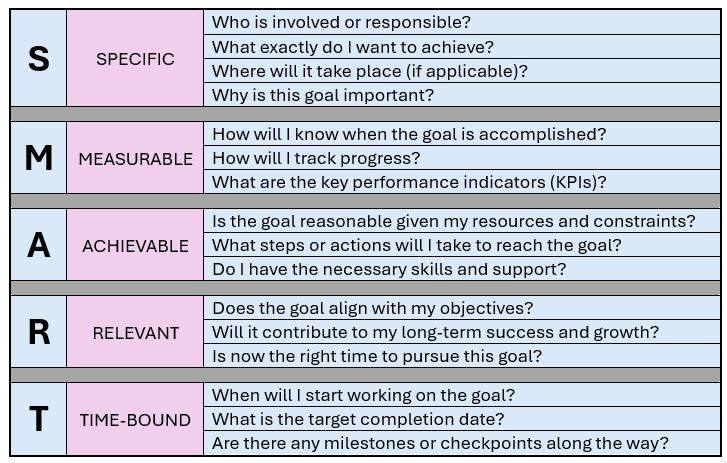
Performance Goals may be added at any time, used in conjunction with evaluations, or as a stand-alone task. Managers may cascade these down to employees or employees may create personalized goals as well. Employees and managers may input goals in Workday at any time using one of the following ways:
1. From the employee’s profile, go to:
- Actions > Talent > Add Goal to Employee OR
- Performance Tab > Goals Tab > Create Goal for Worker
2. Include in the individual’s performance evaluation.
3. If a manager wants to set goals for multiple people, they can use the “Add Goal to Employees” task in the search bar. At this time, the manager may select individuals, teams, or supervisory org groups to add goals for and to cascade these goals down to those groups and subordinate organizations. Once submitted, the business process will route to the employee(s) for “approval” and notification of the new goal(s).
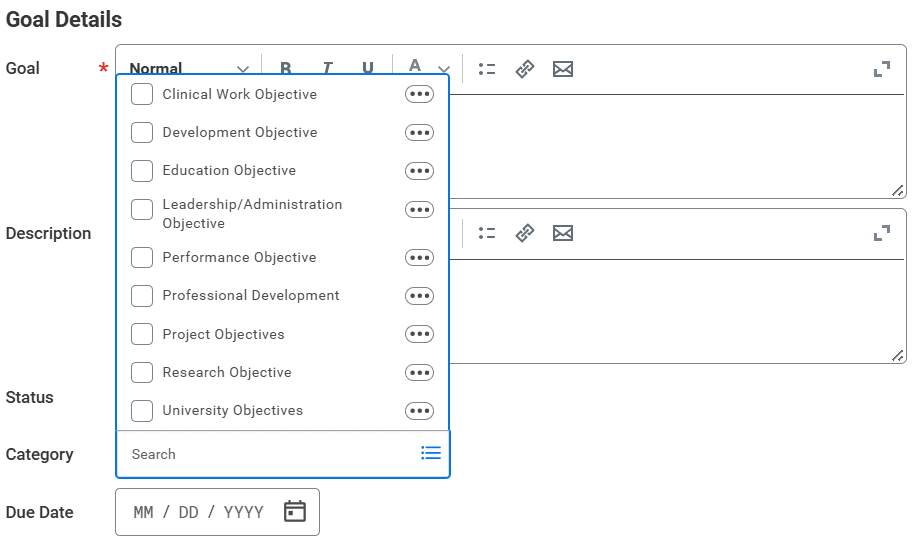
Goals are categorized in Workday as follows: